TRACK 1 AUDIO / SPACE IN YOUR MIX
Stereo panning plugins.
A place for your mix.
Stereo panning chooses left and right. Spatial placement adds the impression of distance and a surrounding space. Compare how seven plugins approach stereo positioning, room simulation and front-to-back depth, and choose the workflow your mix needs.
By Levi Brooks · Published · Updated
Published by Track 1 Audio, maker of Conductor Stage. Third-party descriptions below come from the linked developer documentation, checked . This is a workflow comparison, not a sound-quality ranking, endorsement or measured performance test.
Stereo panning, space emulation and room simulation
A stereo panner moves a source across the left/right image. A space emulating plugin can also coordinate reverb, tone and level so a part feels closer or farther away. Room simulation may go further by modeling reflections, microphone positions or a particular acoustic environment. These terms describe related tasks, but the implementations differ.
Stereo imaging describes the overall image, including width and the relationship between the two channels. Widening a sound does not automatically place it deeper in the mix. Binaural spatial audio is another approach: HRTF or HRIR processing models head-related listening cues, often including elevation and placement around the listener. Check the intended playback format before choosing a spatial audio plugin.
Conductor Stage: position first, space follows
Conductor Stage by Track 1 Audio combines stereo panning and space emulation for your full mix. Move each sound on a virtual stage and coordinate its direction with native reverb, EQ, compression and optional distance attenuation. Set the close sound at the microphone baseline, then shape front-to-back depth while keeping the selected room stable.
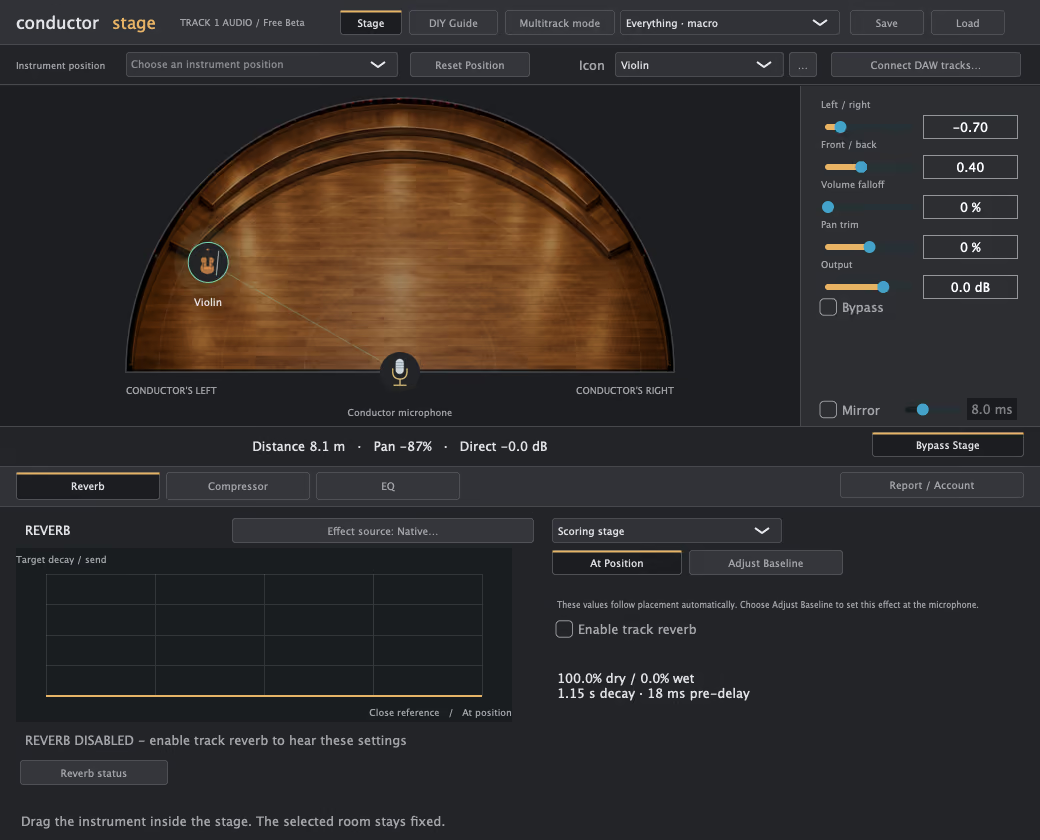
Conductor Stage Free Beta works on one track at a time and downloads without an account. Premium Beta adds linked multitrack master/source control and compatible third-party effect hosting for $69.99 USD once, tax included. Both supply Mac AUv2/VST3 and Windows x64 VST3 builds. Read the beta installation and compatibility notes.
Conductor Stage uses a creative mixing model. It does not claim HRTF binaural rendering, measured room impulse responses, Dolby Atmos output or physics-accurate venue reconstruction.
Compare stereo panning and spatial placement workflows
| Plugin | Documented workflow | What to compare |
|---|---|---|
| Conductor Stage | Stereo stage placement coordinates reverb, EQ, compression and optional volume falloff. Free is single-track; Premium adds shared multitrack control. | Try a position-to-effects workflow on your own material. The free edition requires no account. |
| Auburn Sounds Panagement ↗ | Combines a binaural distance panner with reverb, width and tilt controls. Its free edition omits the full edition’s delay and chip simulation. | Compare its binaural distance treatment with Conductor Stage’s position-linked native reverb, EQ and compression. These are different processing approaches. |
| 2CAudio Precedence ↗ | Uses psychoacoustic stereo positioning for lateral placement and apparent distance. Its linked workflow can coordinate multiple instances and integrate with Breeze reverb. | Compare the stereo positioning workflow and linked-instance control. Conductor Stage Premium brings its own master/source workflow and compatible effect hosting. |
| Parallax Audio Virtual Sound Stage ↗ | The free legacy edition models direct sound and early reflections in virtual acoustic spaces, with source and microphone placement and control of multiple instances. | Compare room and microphone simulation with Conductor Stage’s creative placement model. Conductor Stage does not claim the same acoustic engine or modeled venues. |
| Goodhertz Panpot ↗ | Offers level, delay, spectral and phase panning to shape the stereo image. The developer distinguishes it from an HRTF-based 3D panner. | Compare its panning methods with the broader position-to-effects workflow in Conductor Stage. Conductor Stage does not claim Panpot’s four algorithms. |
| Sennheiser dearVR MICRO ↗ | A binaural 3D panner with azimuth, elevation, room reflections and HRTF choices, described for spatial listening over headphones. | Choose by delivery format. Conductor Stage is a stereo mix placement workflow and does not claim head-related rendering or elevation control. |
| Wave Arts Panorama 7 ↗ | Combines HRIR-based binaural synthesis, room reflections, diffuse reverb and distance modeling. A position sequencer creates trajectories and automatic panning. | Compare its virtual-acoustics and motion tools with Conductor Stage’s stage positioning and linked effects. Conductor Stage does not claim Panorama’s trajectory sequencer or HRIR support. |
Third-party names identify their owners’ products. Track 1 Audio is independent and is not affiliated with these developers. Check their sites for current availability, formats, pricing and support.
Choose by what you want to hear
- A better left/right position: compare a dedicated stereo panning plugin with your DAW’s balance and pan controls.
- A shared sense of space: compare source placement, reverb balance and front-to-back depth. Listen to vocals, drums, guitars and synths together, not just a solo source.
- A virtual acoustic room: look at the documented reflection model, microphone controls and room choices.
- Sound around the listener’s head: investigate binaural rendering and the intended headphone or speaker workflow.
Use the same short passage, keep perceived loudness comparable, and check both stereo and mono. A source that is already wide or reverberant carries its own spatial cues; adding a second space will not remove the first. For a step-by-step example, read our stereo panning and mix depth guide.
Common questions
Is there a free stereo panning and space emulation plugin?
Conductor Stage Free Beta provides single-track stereo panning with position-linked native effects. Its Mac and Windows downloads require no account or email. Panagement also has a free edition, and Parallax Audio publishes Virtual Sound Stage as a free legacy edition; their processing and workflows differ.
Is Conductor Stage an alternative to Panagement or Virtual Sound Stage?
It is an option to evaluate when your goal is placing sounds and shaping distance within a stereo mix. Compare the actual workflow: Panagement documents binaural distance panning, Virtual Sound Stage documents acoustic room and microphone simulation, and Conductor Stage coordinates native effects around a stage position. The label “alternative” does not mean identical sound or features.
Can I use Conductor Stage for vocals, drums, guitars and synths?
Yes. It is intended for your full mix across genres. Place parts individually in Free, or coordinate linked source instances with a Premium master. Start from your existing levels and routing, then decide how much distance treatment each sound needs.
Does a stereo panning plugin replace reverb?
A panner alone chooses direction. Reverb supplies reflections and ambience; EQ and level can also affect perceived distance. Conductor Stage coordinates these choices around position. Other tools may instead focus on panning methods, binaural localization or a particular room model.