Set the sound at the microphone.
Each effect has its own Adjust Baseline subsection. Set the close sound first, then let position add the chosen distance treatment. A dry microphone baseline is the default, not a fixed restriction.
TRACK 1 AUDIO · CONDUCTOR STAGE · BETA
Conductor Stage by Track 1 Audio is a mix placement and depth plugin for your DAW. It connects where a track sits with how it sounds, whether you are mixing vocals, drums, guitars, synths or an orchestra. Drag an instrument across the semicircle and shape its direction, depth and room perspective from the conductor’s microphone.
Mac AUv2 + VST3 · Windows x64 VST3 · Unsigned / unnotarized beta distribution
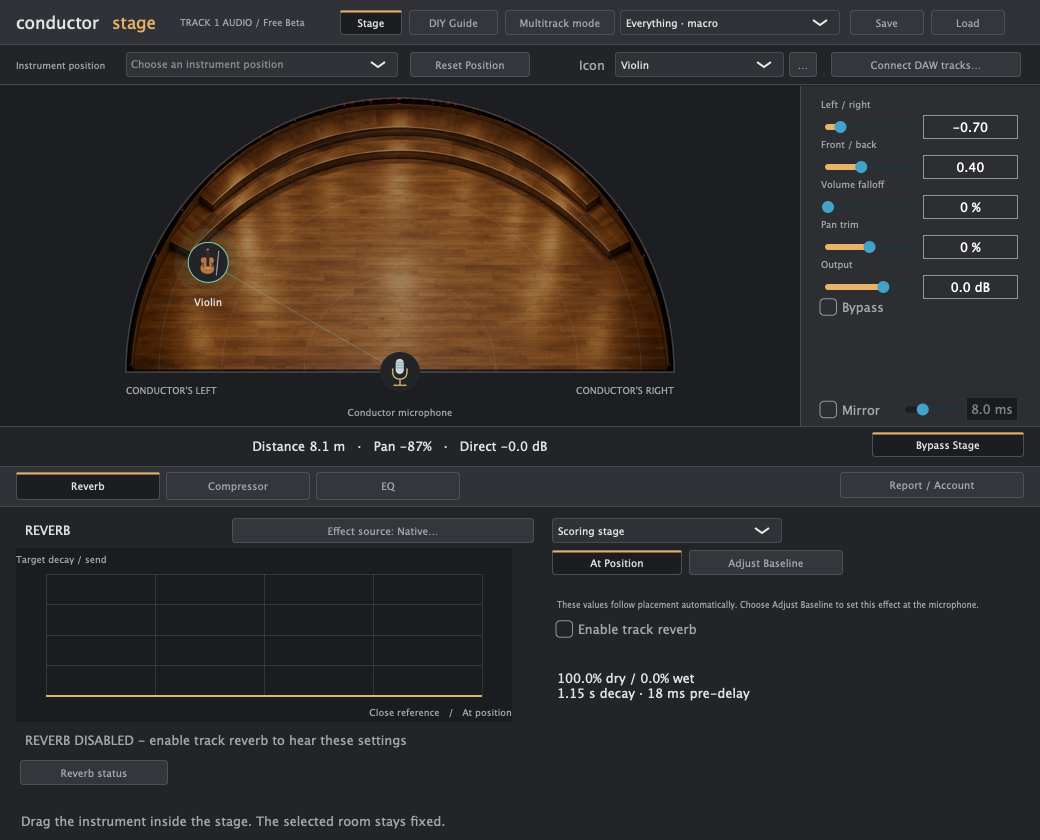
DIRECTION, DISTANCE AND A SHARED ROOM
Moving a part backward is more than turning it down. Conductor Stage links placement with reverb wetness, EQ and compression, while leaving the chosen room stable. It is a practical mixing model, not a measurement of a particular concert hall or a physics-accurate acoustic simulator.
Each effect has its own Adjust Baseline subsection. Set the close sound first, then let position add the chosen distance treatment. A dry microphone baseline is the default, not a fixed restriction.
Reverb interpolates from microphone wetness toward the rear maximum. EQ and compression change relative to their baselines. Room presets suggest a volume falloff, and the slider can reduce it to zero.
Pan derives from the stage position. Mirror adds a second opposite-side voice rather than merely swapping sides. Reset Position returns the instrument exactly to the microphone.
Instrument-position suggestions, selectable instrument icons and saved presets make repeat setups faster. Presets are starting points: choose positions that serve your mix, whatever the genre.
Free Beta gives a single track its own stage and native effects. Premium Beta adds a master that controls linked source instances, supported hosted effects and experimental chain building in Logic. Each edition includes Stage Placement, a separate minimal utility for captured direction, mirror and gain settings.
| Workflow | Free Beta | Premium Beta |
|---|---|---|
| Single-track stage and native effects | Included | Included |
| Position, mirror and volume falloff | Included | Included |
| Macro and effect presets; custom icons | Included | Included |
| Written position-specific DIY guide | Included | Included |
| Stage Placement utility | Included | Included |
| Multitrack master and linked source instances | Not included | Included |
| Host your own compatible effects | Not included | Included; vendor license required |
| Build a current-position chain in Logic | Not included | Experimental; Logic only |
| Activation | No key required | One key per device; online check within 30 days |
Conductor Stage is a mixing plugin for placing tracks across a virtual soundstage. Position coordinates panning, reverb, compression, EQ and optional volume falloff. Free Beta works on a single track; Premium Beta adds linked multitrack control and supported hosted effects. Use it to build space and depth across your full mix, from vocals and drums to guitars, synths and orchestral parts.
It combines placement with native reverb, panning, compression, EQ and optional distance attenuation. Premium can host supported third-party effects. Its purpose is to coordinate those changes around one position.
No. The selected room remains stable while the direct/effected relationship changes with position. You can separately adjust or automate room controls.
No. Distance does not behave like a studio compressor in a literal physical sense. Conductor Stage’s compression is an artistic dynamic treatment tied to position and the selected baseline.
Logic uses the Mac AUv2 build. DAWs that load the supplied VST3 architecture can test the VST3 build, including Live, REAPER and FL Studio where their versions support it. Build success is not host certification. Premium’s automatic chain insertion is experimental and Logic-only. Pro Tools requires an AAX build, which is not included.
The position-specific DIY guide supplies current values and processing order. Premium’s experimental Logic builder can also capture a current-position chain. Algorithm differences mean a stock replacement may approximate the result rather than null perfectly against it.